BEN KENOBI: PRIVATE JEDEYE ∞
Seltsam und großartiges Star-Wars-Referenzgewitter. Kann man nicht erklären, muss man sehen. Just strange. And awesome.
Seltsam und großartiges Star-Wars-Referenzgewitter. Kann man nicht erklären, muss man sehen. Just strange. And awesome.
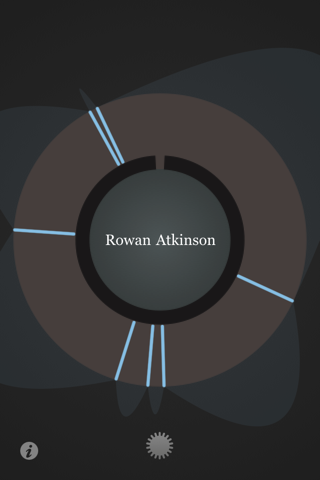
I don’t really like e-books. So, when Stephen Fry announced that his autobiography “The Fry Chronicles” was to be released as an iPhone app, I couldn’t have been less enthusiastic. Of course, me being the novelty-seeking geek I am, I still couldn’t help tapping on the link. I was intrigued enough by the flowery wheel and the prospect of non-linear reading to, after a few days of putting it off, buy the app.
myFry.app is an experiment in reading: The book is split up in 162 shortish “chunks” rather than chapters which are tagged with names of people, themes or places. Those chunks can be accessed by turning the dial on the wheel, tapping and then holding on the screen. The app encourages the reader to follow tags rather than time, to read the book not sequentially, but randomly.
So there I was, playing around with the wheel, finding its behaviour profoundly confusing. I finally managed to start reading the first chunk. Soon, rather than exploring the book through tags, I found myself reading it in the most boring, unexciting, least modern fashion possible: from beginning to end. Somewhere, a clever visionary weeps as I ignore the endless possibilities of tags, touch and technology.


It is an enjoyable book, full of wit, wisdom and if I write one more of those terrible three-part alliterations I’m gonna throw this computer out of the window. Where was I? Ah, the book. It’s good, go read it. Stephen has an interesting life that I enjoy reading about. British universities, the comedy and drama scene, and most of all his insightful, self-deprecating honesty make it a great read.
What I don’t particularly care for, though, is the app itself. I have no terribly big complaints, don’t get me wrong. The text is laid out nicely, the tags might come in useful if I re-read the book at a later time and it hasn’t crashed yet. It works. What it doesn’t do, however, is change the way I read. Call me old-fashioned and boring, but I enjoy watching a narrative unfold as I read from first to last page. How am I supposed to understand a chapter on Stephen’s work at the BBC if I don’t know how he got there? And who, on Earth, is this Kim?
It is reading the book in a linear way that the app makes harder than it should. There is no easy way to just jump to the next chunk, I always need to fiddle around with the wheel. Distracting. Fixing that would be easy, I simply need some navigation at the bottom of the chunks. One button labelled “next part” would be enough. Trying out new ways of reading is great, but it shouldn’t degrade the “usual” reading experience for no reason.
Other than that, reading in the app is quite pleasant. It looks great, a lot like Plain Text, the app I use for writing these words in a terribly crowded train on a Saturday morning. The chunks are small enough for very short reading sessions. Instead of checking Twitter at the bus stop, I simply read a part of the book, often receiving strange looks as I chuckled at one of Stephen’s jokes. Watching the wheel navigation slowly fill up with chunks marked as read is gratifying in the same way as seeing a bookmark slowly wander from top to bottom is. It’s a great visualisation of reading progress.
In the end, the decision whether to buy Stephen’s book in paper or app form is a matter of taste, not of technology. It certainly is a great book and deserves being consumed in any form. Wow. That kind of made me want to buy the audio book as well.
Wundert euch nicht über das Englisch hier. Ich hatte einfach mal Lust, wieder einen Artikel in dieser Sprache zu schreiben. ;-)
Eine kurze Dokumentation über Schreibtische, und ihre Bedeutung für kreative Arbeit. A short documentary on desks and their meaning to the creative process.
Ein sehr kritisches (und witziges) Kommentar zu den “Buchvisionen” von IDEO. Thibaut Sailly sharply (and humorously) criticizes IDEO’s ideas on the future of books.
… wie man sie sich bei IDEO vorstellt. Interessant auf jeden Fall. “Nelson” erscheint mir etwas zu sehr von der Diskussionswilligkeit aller Leser auszugehen. “Coupland” ist eine tolle Idee und “Alice” finde ich großartig. …as IDEO sees it. Those are pretty awesome ideas. I’m not sure about “Nelson”, though. It seems to be just a tad overconfident in the readers’ willingness to actually discuss.
Epic.
Die Stundenpläne meiner Schule waren mir nicht schön genug, deshalb habe ich mir einen eigenen in HTML und CSS gebaut. Damit sind dann auch die letzten drei Tage gefüllt gewesen… Our school’s timetables are pretty terrible, so I built a better one in HTML and CSS.
Hessi von Bits und so erklärt, wie man mit iTunes komplexere Systeme zur Verwaltung von Musik erstellt. Eines der Ziele ist es, immer automatisch Musik vorgespielt zu bekommen, die man mag und länger nicht gehört hat. Und nach Sternen aufgeschlüsselte Playlists zu erstellen. Und Playlisten eine bestimme Größe für die Synchronisierung zuzuweisen. Und… Bis jetzt sind zwei Teile verfügbar, aber es werden wohl noch einige folgen. (Teil: 1, 2)
A power-user’s guide to iTunes on how to create an OCD anal complex system for dealing with music. Worth a read. There are two parts already available, but I believe there will be many more… (Part: 1,2)
Ein ganz genauer Blick auf die Entwicklung des Layouts von National Geographic. An in-depth review of the National Geographic layout over time.
Lesen, nicken, und etwas besser weiterleben.
Für den kritischen Zeitungsleser von heute. Schade, dass man so etwas braucht…
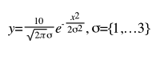
Manchmal habe ich meinen Computer in der Schule dabei, und ich nutze die Gelegenheit immer gerne dazu, im Physikunterricht mitzuschreiben. Unser Lehrer ist in dieser Hinsicht liberal, und mal den Stift für eine Stunde aus der Hand zu legen ist eine willkommene Abwechslung. Aufschriebe am Computer sehen außerdem so angenehm professionell aus.
Dabei wird allerdings das Eingeben mathematischer Ausdrücke zum Problem. Bei Potenzen kann man sich ja noch mit ”2” oder Ähnlichem behelfen, aber bei den Gleichungen, die in einem in Physik an den Kopf geworfen werden, hat man so keine Chance. Griechische Buchstaben muss man sich mühsam aus der Sonderzeichentabelle zusammenkramen, Bruchstriche durch Klammern und Schrägstriche ersetzen und Multiplikationen durch Sternchen. Da ist man mit Stift und Papier nicht übersichtlicher, sondern auch bedeutend schneller.
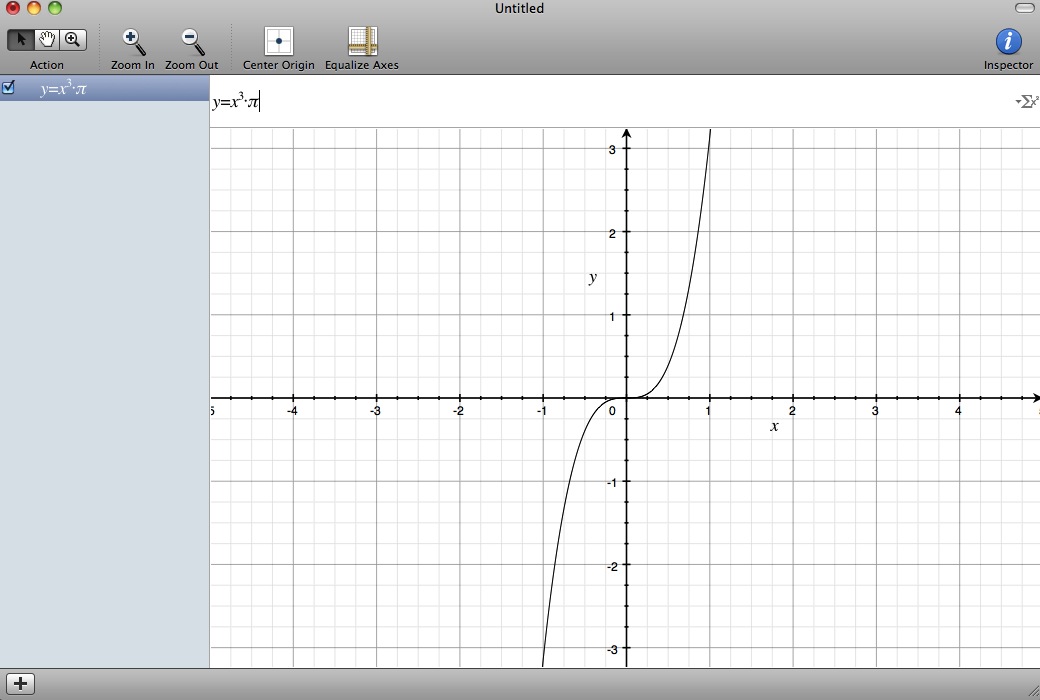
Glücklicherweise hat sich dieses Problem vor kurzem gelöst, denn durch Zufall bin ich auf “Grapher” gestoßen, ein kleines, in Mac OS X mitgeliefertes Werkzeug zum graphischen Darstellen von Funktionen. Das ist an sich schon ausgesprochen interessant und hätte mir auch so schon die eine oder andere Minute des Herumhackens auf einem TI-83 erspart. Viel interessanter ist für mich aber die Eingabezeile für die zu zeichnende Funktion.
In dem unscheinbaren Programm verbirgt sich nämlich eine beinahe perfekte Implementation einer Eingabemöglichkeit für mathematische Ausdrücke aller Art. Gibt man zum Beispiel x3 ein, wird automatisch x3 daraus. Tippt man /, wird ein Bruchstrich gezogen. Ein “pi” wird zu π, ein “delta” zu δ, ein großes “Delta” zu Δ, ein “phi” zu ɸ. Die Ergebnisse kann man ohne Probleme in Pages einfügen, oder sich auch als PDF oder LaTex-Ausdruck exportieren lassen.
 Irgendwie fasziniert mich diese einfache Eingabezeile, weil sie ein Problem so elegant löst. Sie funktioniert genau so, wie ich es vermutet habe. Ich tippe ””, um eine Potenz zu schreiben, und automatisch wechselt die Eingabe auf die höhere Ebene. “Wie komme ich wieder zurück?”, denke ich mir und drücke die “Pfeil-Nach-Unten”-Taste. Das Erwartete tritt ein. Wie bei allen guten User Interfaces macht die Interaktion hier einfach Spaß. Gute User Interfaces machen eben schlicht und einfach Spaß.
Aufmerksam auf Grapher wurde ich durch diesen Artikel, in dem die Entwicklung des ersten in Mac OS mitgelieferten graphischen Taschenrechners beschrieben wird. Ich hätte eigentlich erwartet, dass Grapher der Nachfolger dieser Software ist, doch eine kurze Recherche hat ergeben, dass “Grapher” unabhängig entstanden ist und später von Apple aufgekauft wurde.
Weiterführende Informationen und eine ausführliche Bedienungsanleitung, die ich mir auch bald zu Gemüte führen werde, finden sich bei MacRumors und Wikipedia (deutsch), wo auch mein Anwendungsfall beschrieben wird:
Further, it is also possible to use the operating system’s copy and paste feature to copy equations from the application’s visual equation editor. By doing so, Grapher functions somewhat as an equation editor, as the user may copy images of entered equations into other applications.
Eine großartige Entdeckung auf jeden Fall – und eine schöne Überraschung. Ein bisschen wie Weihnachten.
Entspannend. Destruction in slow motion. Very… relaxing.
Die Geschichte eines Buches. Finanziert durch Kickstarter, gedruckt mit Liebe zum Detail. A book’s story.
Eine interessante Beobachtung: Der Doppelpunkt erfährt eine Renaissance– und eine Erweiterung seiner Funktion. An interesting observation: the colon is experiencing a renaissance as “jumper colon”.
Hi, I'm Marcel. This is where I put stuff on the internet. You can follow me on Twitter, or read the about page (if you're into that sort of thing).